

Installing a reflection app takes about twenty seconds. Sticking with one takes months, and most people work that out the hard way. The app store listing shows you screenshots of calm gradients and tidy prompts. It does not show you how many taps it takes to log a thought at 10pm, whether your notes can leave with you, or what happens to your writing when a trial ends.
Those are the things that decide whether a daily self reflection app becomes a genuine habit or another icon you delete in a fortnight. Here is what to check before you commit, and why each item matters more than the feature list on the download page.
Start With the Habit, Not the Feature List
Reflection apps are not interchangeable. Some are prompt libraries. Some are mood trackers. Some are structured coaching tools that push you through a guided session every day. The one you want depends on what a realistic entry looks like for you on a bad day, not a good one.
Reflection.app, for example, guides you through highlights and lowlights and then prompts you to reflect on six dimensions of life: mind, body, soul, work, play and love. Reflectly leans on AI-guided prompts, mood insights and a home-screen widget, and describes itself as a journal for dealing with negative thoughts and building a gratitude practice. On Android, comparison roundups have pointed to Reflection for AI-enhanced insight, Journey for cross-platform writing and Stoic for guided morning and evening practice.
Each of those is a different daily ritual. If you want to rate your day and write two sentences, a long guided session will feel like homework. If you need structure to get started, a blank text box will stay blank.
Friction and Capture Speed
Why the two-minute target matters
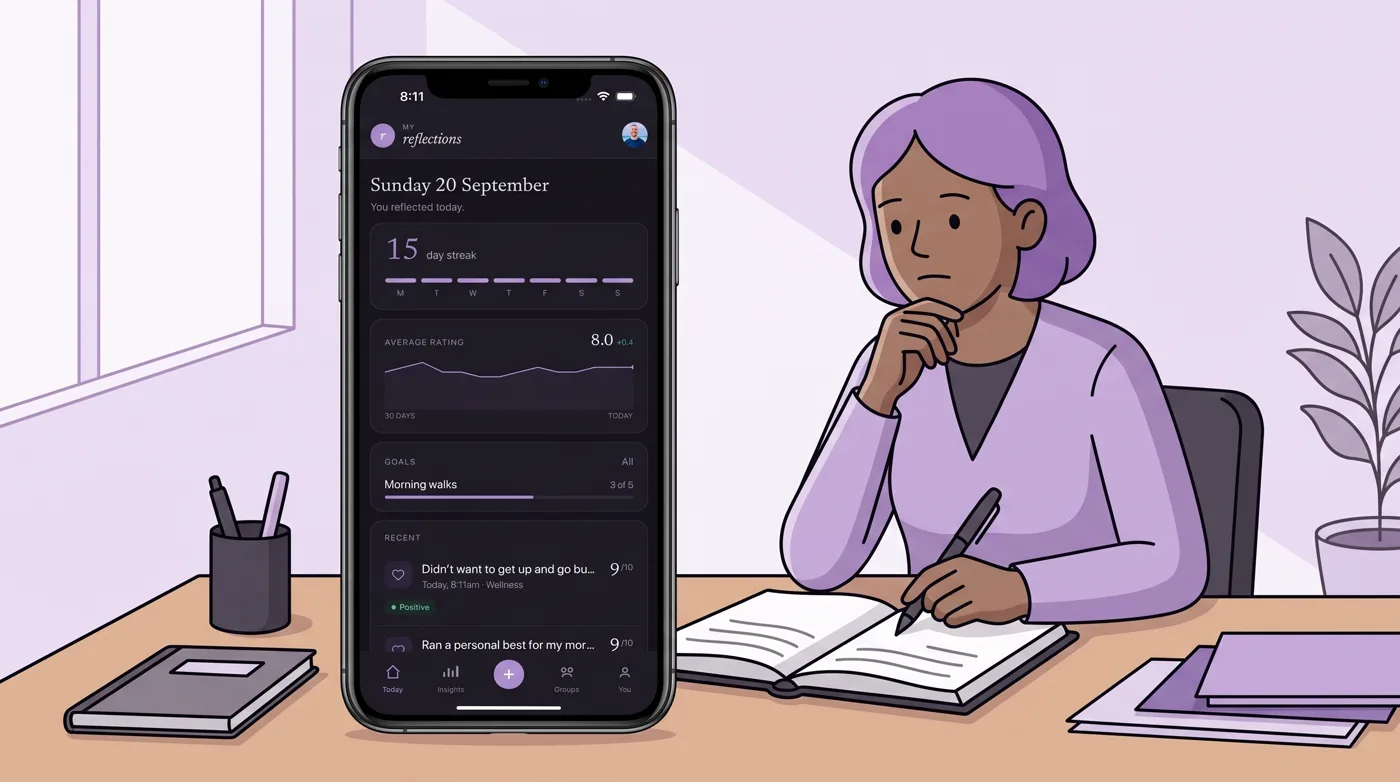
The habit only survives if it is cheap to perform. My Reflections is built around roughly two minutes a day: a rating plus a short note. That is a deliberately low bar, and it is the right shape for most people. Anything that takes ten minutes will get skipped on a busy Tuesday, then again on Wednesday, and by the weekend you have stopped opening it.
Before you install, picture the worst realistic moment you would want to capture something. Then check how many steps the app needs from there. Can you start a new entry from a home-screen widget? Does it work without a signal? Does it sync later once you are back online? My Reflections runs offline-first with sync, which matters on trains, planes and anywhere with patchy reception. Reflection.app and Reflectly both make use of home-screen widgets to keep the habit visible.
What Happens to Your Entries After You Write Them
Export and deletion are not optional extras
Journal entries are some of the most personal text you will ever type. A reflection app is holding a record of your worries, your relationships and your mistakes. So the first question is not what the app can do with that record. It is whether you can take it with you.
Look for a one-file export that gives you everything in a format you can read without the app. Look for real deletion, not just an archive button. My Reflections offers one-file export and deletion, and treats your notes as private by default with no advertising use of note content. If an app makes it easier to get data in than out, treat that as the warning sign it is.
Where your data lives and who else can see it
Privacy defaults vary widely, and a 2026 test of seven reflection tools treated privacy as one of four core criteria alongside prompts, mood context and AI pattern recognition. That tells you something about how much the category has shifted. Apps are now reading your entries, not just storing them.
If you write about other people, which coaches and team leads inevitably do, check two things. First, whether your notes are used to train models or feed advertising. Second, what happens if you join a shared space. My Reflections supports open, closed and invited groups with shared reports and facilitation, which is useful for coaching clients and peer circles, but you should know exactly what is visible to the group before you type anything sensitive into it.

Does the App Give Anything Back?
Ratings, tags and search
A daily note on its own is just a diary. The value appears when the record becomes searchable. One of the most common reasons people go looking for a reflection app is wanting to recognise past mistakes and avoid repeating them, and that requires being able to find the earlier entry.
Check whether the app supports tags, a daily rating and keyword search. Check whether it can show you tone or sentiment across your entries. My Reflections includes tone and sentiment analysis, tags and goals, all built on top of the rating-and-note format. Without search, you have written everything and can retrieve nothing.
Monthly reviews and pattern recognition
Daily capture is the input. The output is the review. Reflection.app advertises coaching in real time and turns entries into insights. Reflectly offers mood insights. My Reflections goes further with deep-dive monthly reports that pull a month of entries into one view.
There is one distinction worth holding onto here. An app that surfaces patterns from your own writing is helping you reflect. An app that writes the reflection for you is doing something else entirely, and you should decide which one you actually want.
Streaks, Guilt and Gamification
Many apps use a streak counter to drive daily engagement, and widget-based streak nudges are a common design pattern across the category. Streaks work, up to a point. They also punish you for being human. Miss three days and some people quietly quit rather than face a reset counter.
Decide in advance how you want to be nudged. Notifications that remind you at a set time are useful. Notifications that scold you are not. My Reflections takes an explicitly anti-gamification line on this, and it is worth checking any app’s streak behaviour before you hand it permission to send you push messages.

Platform, Sync and Everyday Practicalities
Check that the app exists everywhere you actually write. My Reflections runs on iOS, Android and the web. Reflection.app is available on iOS and Android. Cross-platform writing is one of the reasons Journey gets recommended in Android roundups. If you draft on your laptop and capture on your phone, confirm the two views stay in sync before you build a year of history in one of them.
Group, Coach and Team Features
If you are a coach, a facilitator or a team lead, your requirements are different. You need to create groups, invite the right people, keep others out, and share reports without exposing individual notes you were never meant to read. My Reflections supports open, closed and invited groups with shared reports and facilitation tools, plus a professional tier covering photo journals, groups you create, schedules and webhooks for $2.99 per month with a 7-day trial and per-seat options.
Free Versus Paid: What the Paywall Actually Gates
Most apps in this category mix a free entry point with in-app purchases. Reflectly, for instance, is free to download with in-app purchases, listed in Health & Fitness with a 9+ age rating. Free tiers are a fair way to test a habit, and there is nothing wrong with them.
The thing to check is what sits behind the wall. If export, full history, search or monthly reports are paywalled, then your free trial is not really a trial of the product you would rely on. Use the trial window to test the paid features, then decide.

A Pre-Install Checklist
| What to check | What good looks like | Why it matters |
|---|---|---|
| Capture speed | A rating plus a short note in around two minutes, with a widget option | High-friction apps get abandoned within weeks |
| Offline access | Entries can be written without a signal and sync later | Reflection often happens away from reliable Wi-Fi |
| Export | One-file export of everything you have written | Your record should outlive the app |
| Deletion | Genuine removal of entries on request | You need a way out, not just a way in |
| Privacy defaults | Private by default, no advertising use of notes, clear model-training policy | Entries often involve other people |
| Search and tags | Keyword search plus tags and daily ratings | Patterns only emerge if you can find the past |
| Review cycle | Monthly summaries, tone or sentiment views | Daily capture needs a payoff |
| Streak design | Gentle reminders, no punishment for missed days | Guilt-driven apps get deleted |
| Group sharing | Clear control over what is shared and with whom | Coaches and facilitators handle sensitive notes |
| Paywall limits | Export, history and reports testable during the trial | You should not discover limits after a year of entries |
Frequently Asked Questions
Are free daily self reflection apps worth using?
Yes, as a test. Many apps in this category are free to download with in-app purchases, which lets you check whether the daily habit actually sticks before you pay anything. The catch is that free tiers often gate export, history or monthly reports, so use the free period to find out what sits behind the paywall rather than assuming you have seen the whole product.
Is my journal data private?
It depends entirely on the app, so check before you write anything you would not want read. Look for private-by-default settings, a clear statement about whether notes are used for advertising, and a plain answer on whether entries train AI models. My Reflections takes a private-by-default approach with no advertising use of notes, and offers one-file export and deletion so you keep control.
How long should a daily reflection take?
Around two minutes is a realistic target for most people. A rating plus a short note is enough to build a searchable record over time, and a low bar is what keeps the habit alive on difficult days. Longer guided sessions suit some people, but if your chosen app demands ten or fifteen minutes, expect to skip it often and eventually stop.
Do I need prompts to reflect daily?
Not necessarily. Prompt libraries help if you tend to freeze in front of a blank page, and apps such as Reflection.app offer hundreds of daily prompts including a gratitude focus. If you already know what you want to record, prompts can slow you down. A simple rating plus a note covers most of what daily reflection needs.
Can I use a reflection app with a coach or a group?
Yes, several apps support shared reflection. My Reflections offers open, closed and invited groups along with shared reports and facilitation tools, plus a professional tier with schedules, webhooks and per-seat options. If you share entries, confirm what group members can see and whether individual notes stay private before you invite anyone in.
None of these checks take long, and most can be answered during a free trial or a quick look at the app’s help pages. The point is to test the boring parts first, the ones that determine whether you are still writing entries three months from now. Pick the app that makes the daily entry easy, keeps your writing yours, and shows you something useful when you look back. Then verify the current pricing, privacy policy and platform availability directly with the app provider, since these details change.
Try the two-minute version tonight.
Reflecting is free, on iPhone, Android and the web. Professional has a 7-day trial.
Get the appKeep reading

Reflection practice
Daily Self Reflection App: What to Check Before You Install
Before installing a daily self reflection app, check the daily loop, privacy, export, pricing and missed-day streak behaviour.
Reflection practice
Self Reflection App: How to Choose One You Will Still Open in 2026
Not every self reflection app earns a second week. Judge prompts, privacy, export and friction before you download one you will still open in 2026.